Legal document automation uses templates, decision logic, and clause libraries to assemble contracts, pleadings, and forms without a fee-earner retyping the same paragraphs matter after matter. It works best for repeatable, template-driven documents like NDAs, engagement letters, or standard leases, where it cuts drafting time and clause errors sharply. Firms handling bespoke, high-stakes drafting still need supervised human judgment layered on top.
TL;DR:
- Smaller firms typically only need hosted questionnaire tools, while larger firms with sensitive matters require single-tenant or on-premise deployment for better data control.
- The most advanced platforms support conditional clauses, integration with management systems, and detailed audit logs to ensure governance and compliance.
- Deployment should follow staged pilots focusing on high-volume, low-complexity templates, with clear success metrics and thorough testing before full rollout.
- Ethical compliance needs ongoing supervision, clear ownership of audit trails, and systematic verification to meet ABA and regulatory standards.
- Proprietary ownership of automation systems with secure, self-hosted architecture best suits firms handling privileged or high-conflict cases, avoiding shared SaaS risks.
Table of Contents
- What Is Legal Document Automation, and Which Type Fits Your Firm?
- What Features Should Lawyers Expect in a Document Automation Platform?
- What Business Benefits Does Legal Document Automation Actually Deliver?
- How Should Your Firm Evaluate and Choose a Platform?
- What Ethical and Regulatory Obligations Apply to Automated Drafting?
- How Does Automation Fit Into Everyday Law Firm Workflows?
- What Does a Practical Rollout Look Like From Pilot to Scale?
- How Autonomousfirm Approaches Compliant Legal Automation
- Author Perspective: Common Pitfalls and Pragmatic Trade-Offs
- Ready to Build Compliant Legal Automation? Here’s Where to Start
- Sources
- FAQ
What Is Legal Document Automation, and Which Type Fits Your Firm?
Two design philosophies dominate the market, and confusing them leads to a lot of wasted procurement cycles. Questionnaire-driven systems ask a series of intake questions and generate a document from the answers, front-loading logic into a wizard. Clause-library systems instead let drafters assemble documents from pre-approved, version-controlled clauses, which suits firms with heavy negotiation volume where the exact wording matters more than the intake flow.
The second fork is where the software lives. Standalone document assembly engines specialize purely in template logic and often integrate into whatever practice-management system a firm already runs. Practice-management platforms with automation built in trade some flexibility for a single login and unified matter data, which smaller firms tend to prefer.
The third decision, and the one compliance officers care about most, is deployment architecture:
- Hosted multi-tenant SaaS: lowest upfront cost, fastest setup, but client data sits alongside other tenants’ data on shared infrastructure.
- Single-tenant or logically isolated hosting: higher cost, but data stays segregated, which matters for firms bound by strict conflict-of-interest walls.
- On-premise or private-cloud deployment: maximum control and strong confidentiality posture, at the cost of needing in-house or partner infrastructure support.
A small estate-planning practice generating wills and trusts rarely needs anything beyond a hosted questionnaire tool. Larger firms handling complex matters usually need single-tenant or on-premise deployment with contractual data controls, because the confidentiality exposure of a shared-tenant breach is not a risk most managing partners will accept.
What Features Should Lawyers Expect in a Document Automation Platform?
The functional gap between adequate and excellent legal document automation software shows up in five places, and procurement teams often miss at least two of them.
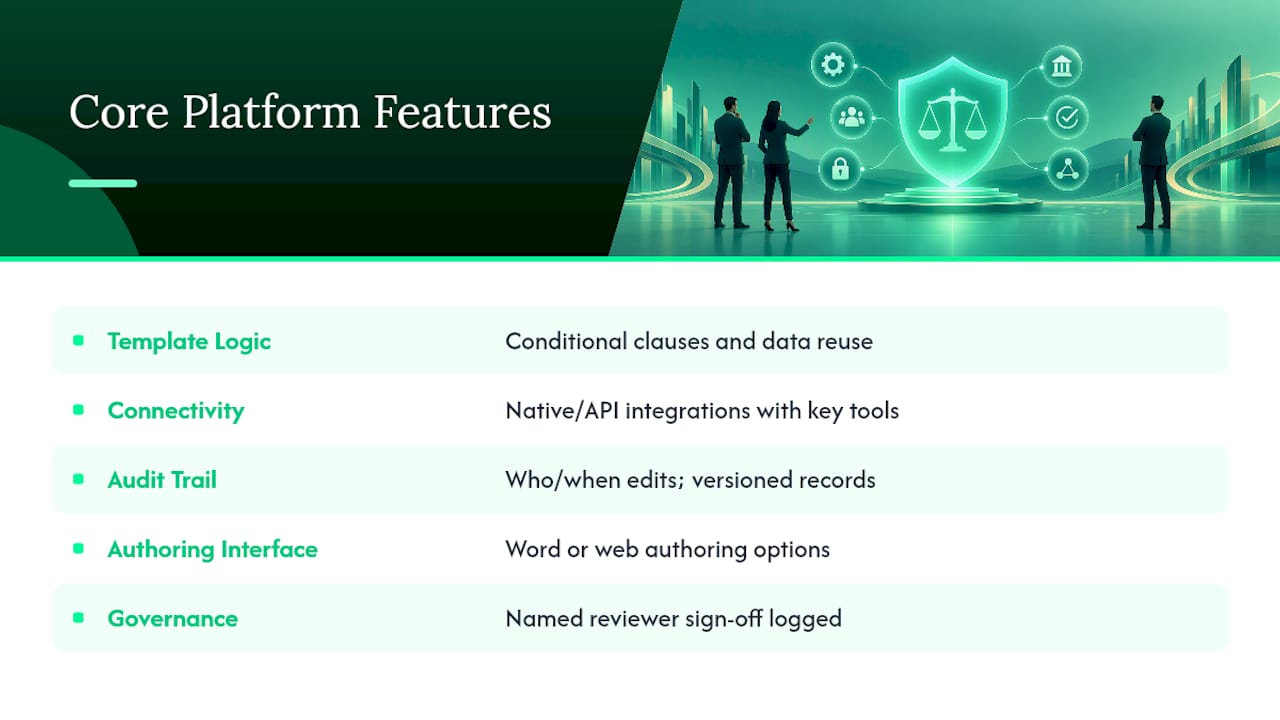
Template logic and data reuse. The system should support conditional clauses (if the client is a corporation, insert indemnification language; if an individual, skip it), variable mapping across related documents, and the ability to pull a client’s name, address, or matter number once and populate it everywhere it recurs.
Connectivity. Look for native or API-based integration with your matter management system, e-signature tools, and court e-filing portals. A platform that generates a perfect document but requires manual re-entry into your case management software just relocates the busywork.
Audit trail and version control. Every generated document needs a record of who created it, which template version it used, what edits were made, and when. Role-based access control determines who can approve final language versus who can only draft, and exportability means you can pull that audit history out if a regulator or malpractice insurer asks.
Authoring interface. Word-based authoring lets lawyers stay in the tool they already know; web-based authoring often offers tighter logic controls and cleaner version history. Neither is objectively better. Match it to how your attorneys actually work.
Governance features. A named accountable reviewer should sign off before a document leaves the firm, and the system should log that approval as part of the permanent record.
Pro Tip: Ask any vendor demo to show you the audit log for a document that was edited twice after generation. If they cannot produce a clean, timestamped chain in under a minute, that is your answer about their governance maturity.
What Business Benefits Does Legal Document Automation Actually Deliver?
The returns show up in four measurable places, and they compound faster than most partners expect.
- Time savings: routine documents that took an associate 45 minutes to draft from scratch often take under 10 minutes to generate and review.
- Error reduction: consistent, pre-approved clause libraries eliminate the copy-paste mistakes that show up when someone reuses last year’s contract and forgets to update a jurisdiction clause.
- Capacity scaling: a paralegal can process a volume of standard leases or NDAs that would otherwise require adding headcount.
- Client experience: turnaround on routine matters shrinks from days to hours, which shows up directly in client satisfaction scores.
A useful comparison point: firms that shift to a hybrid model, using deterministic automation for high-volume repeatable work and reserving governed generative AI for bespoke drafting, tend to see the steepest efficiency gains because the automation absorbs the predictable volume while human judgment stays focused where it adds the most value.
Track three KPIs after any deployment: cycle time per document type, error rate caught in review versus error rate caught by the client, and documents produced per fee-earner per month. Without baseline numbers before rollout, you cannot prove the investment worked, and partners will ask.
How Should Your Firm Evaluate and Choose a Platform?
Run this sequence before signing anything:
- Map your use cases. List every document type your firm produces more than a handful of times per month, then rank them by volume and complexity. Automate the high-volume, low-complexity ones first.
- Calculate total cost of ownership. Licensing is the visible number; template-building time, staff training hours, and the cost of migrating existing templates are the hidden ones. Ask what happens to your data and templates if you switch vendors later, because switching costs are where firms get trapped.
- Assess build effort. Decide between a vendor-managed setup, where the provider builds your templates, and an in-house build, where your own staff configure the logic. In-house gives more control but demands real staff time upfront.
- Run the security checklist. Require zero data retention or a contractual equivalent, single-tenant or logically isolated environments, and SOC 2 Type II evidence before any client data touches the system.
- Ask the hard questions. Who owns the audit trail? Can you export templates and logs if you leave? Is there a named accountable officer on the vendor side responsible for incidents?
Pro Tip: Treat “we’re SOC 2 compliant” as the start of the conversation, not the end. Ask for the actual report and read the exceptions section. That is where vendors bury the gaps.
Red flags worth walking away from: vendors who cannot explain their data retention policy in plain language, platforms with no version history on templates, and any contract that does not spell out data ownership on termination.
What Ethical and Regulatory Obligations Apply to Automated Drafting?
Automating drafting does not automate away a lawyer’s professional obligations, and this is where firms get into real trouble.
ABA Formal Opinion 512 requires lawyers using generative AI tools to maintain competence in how the technology works, protect client confidentiality under Rule 1.6, supervise nonlawyer assistance under Rule 5.3 (which extends to AI systems acting in a paralegal-like capacity), and obtain informed client consent when confidential information feeds into an AI system. None of that changes because the drafting is automated rather than manual.
The NIST AI Risk Management Framework offers a practical structure for meeting those obligations: Map the risks specific to your use case, Measure how the system performs against defined criteria, Manage the risks you find, and Govern the whole lifecycle with clear ownership. Applied to legal drafting, that means someone at your firm should be able to answer, for any automated document, what could go wrong, how you would catch it, and who is accountable if it does.
Practical controls that satisfy both the ethical rules and a malpractice insurer’s expectations include tamper-evident audit trails, a named supervising attorney who signs off before a document leaves the building, and systematic citation or clause verification before filing. The OMP CiteGuard profile describes exactly this kind of architecture: a tamper-evident audit trace paired with a named supervising-attorney requirement, built specifically to satisfy Rule 5.3 supervision duties.
A functioning drafting platform can still fail an audit if it cannot produce a tamper-evident record of who approved what, and when. Compliance and security are not the same test, and a vendor that passes one does not automatically pass the other.
Operationally, this means building escalation gates into your workflow (any document above a certain risk threshold routes to a named human reviewer before it goes out), and keeping hash-chained logs that can reconstruct exactly what happened if a malpractice claim or bar complaint ever asks.
How Does Automation Fit Into Everyday Law Firm Workflows?
A working automation pipeline usually follows the same four-stage path, regardless of practice area:
- Client intake and questionnaire. A client or intake staffer answers a structured questionnaire, which automatically opens a new matter in your practice management system and populates the client’s core data.
- Template mapping and draft generation. The system matches the intake answers to the correct template and clause set, generating a first draft in minutes rather than hours.
- Review queue and attorney sign-off. The draft routes to a review queue where the named supervising attorney checks the substance, not just the formatting, before approving it.
- E-signature and filing. Once approved, the document routes to e-signature software or directly into a court’s e-filing portal, closing the loop without anyone re-keying data.
The efficiency multiplier shows up in data reuse across bundled documents. A single real estate closing might need a purchase agreement, a disclosure form, and a closing statement, all pulling from the same underlying client and property data. Middleware or API connections between your document engine, billing system, and practice management platform determine how much of that reuse happens automatically versus how much still requires manual re-entry.
What Does a Practical Rollout Look Like From Pilot to Scale?
Firms that succeed with automation almost always follow a staged rollout instead of a big-bang deployment.
- Pick a narrow pilot. Choose one to three high-volume, low-complexity templates, like NDAs or standard engagement letters, and define success metrics before you start: target cycle time, error rate, and adoption rate among staff.
- Run the deployment through governance gates. The DEPLOY-5 framework offers five checkpoints worth adapting to a legal context: confirm the context and stakes of the document type, gather evidence that the template performs correctly, verify safety and control mechanisms are in place, confirm operational readiness and monitoring, and get explicit accountability sign-off before wider rollout.
- Build and test deterministically. Build the template logic, then test it against edge cases (unusual jurisdictions, non-standard entity types) before trusting it with live client work. Lock the tested version under version control.
- Roll out with training, then monitor. Train staff on the new workflow, then monitor for drift, meaning cases where the automation starts producing outputs that need more manual correction than expected, which usually signals a template gap rather than a tool failure.
Pro Tip: Resist the urge to automate your most complex document type first because it looks like the biggest win. Start with your highest-volume, lowest-complexity template instead. Early wins build staff trust, and trust is what determines whether adoption actually happens.
How Autonomousfirm Approaches Compliant Legal Automation
Autonomousfirm builds AI-native systems specifically for regulated industries, including the finance and healthcare sectors, where getting compliance wrong carries real consequences, not just inconvenience. That background shapes how the firm approaches legal automation: compliance and security controls get designed in from the start rather than retrofitted after a platform ships.
The core commitment is proprietary knowledge transfer, meaning firms keep ownership of the system and the data it runs on, rather than renting access to a vendor’s shared infrastructure. That maps directly onto the governance controls covered above: a named accountable officer on the build side, tamper-evident audit logging built into the architecture, and single-tenant deployment options for firms that cannot accept shared-tenant risk.
The scaling claim matters here too. The stated goal is helping firms grow operations significantly without adding headcount, which is the same throughput math that makes document automation worth the investment in the first place: more matters handled by the same team, with a verifiable record of every step along the way.
Author Perspective: Common Pitfalls and Pragmatic Trade-Offs
Deterministic automation should handle most of your routine document volume. Governed AI belongs on the edge cases, not the other way around, and firms that reverse that priority end up paying for flexibility they did not need on documents that never varied in the first place.
The most common underestimate is template complexity. A “simple” NDA template often hides a dozen jurisdictional variants nobody accounted for at kickoff, and stakeholder time to review edge cases always runs longer than the pitch deck promised. Budget for it upfront.
If your firm’s document needs are truly generic, off-the-shelf tooling works fine. If you need deep integration with proprietary workflows or strict data sovereignty, a partnership build starts making more financial sense than licensing fees that compound for years.
— Matevz
Ready to Build Compliant Legal Automation? Here’s Where to Start
Autonomousfirm’s advantage over a licensed automation product is ownership: instead of renting a template engine you can never fully control, you get a custom-built system your firm owns outright, with private or self-hosted deployment so client data never leaves your environment.
That distinction matters most for firms handling privileged, cross-border, or high-conflict matters, where a shared-tenant SaaS tool simply cannot meet the confidentiality bar. The team comes out of regulated sectors, including ISO 27001 environments, finance, and pharma, where compliance failures carry real regulatory weight, and that discipline carries directly into how legal automation systems get architected: named accountability, tamper-evident logging, and single-tenant options from day one.
Engagements typically start with a discovery conversation and a scoped pilot rather than a full commitment, so you can see the architecture and governance approach before deciding to scale it firm-wide. If your firm is weighing a custom build against another year of licensing fees, start with the Partnership mode overview or explore the AI OS platform to see how a compliance-first deployment is structured, then request a pilot scoping conversation to map your own use case.
FAQ
What Is the Difference Between Document Assembly and AI Legal Documents?
Document assembly uses deterministic templates and logic trees to produce consistent output every time, while AI-driven legal document generation uses machine learning to draft more flexible, novel language. Most compliant firms use deterministic assembly for high-volume repeatable documents and reserve supervised generative AI for bespoke drafting.
Do Law Firms Need Special Software or Can General Tools Work?
General word-processing tools lack the audit trails, version control, and role-based access that regulators and malpractice insurers expect from legal document automation. Purpose-built platforms or custom systems, like those Autonomousfirm designs for regulated industries, build those governance features into the architecture from the start.
Is Legal Document Automation Ethically Compliant Under ABA Rules?
Yes, when the firm maintains the obligations set out in ABA Formal Opinion 512: competence in the tool, client confidentiality, supervision of the automated output, and informed consent where client data is involved. The technology itself does not create or remove the ethical duty.
How Much Does Legal Document Automation Cost Beyond Setup?
Costs extend past licensing into template-building time, staff training, ongoing maintenance, and vendor support fees, which together often exceed the initial setup quote. Custom builds, such as those Autonomousfirm structures through its Partnership mode engagements, price based on scope rather than a published tier, so firms should request a specific assessment for their use case.
What Security Certifications Should a Vendor Have?
Look for SOC 2 Type II evidence, zero data retention or its contractual equivalent, and single-tenant or logically isolated hosting for confidential matter data. A vendor unwilling to produce the actual audit report, not just a compliance badge, is a warning sign worth taking seriously.


